
FAQs & Help
Fast answers for ordering, shipping, returns, technical resources, and Air Vise product setup. If you don’t see your question, open the Contact pop-up and we’ll help.
General Questions
What is an Air Vise?
An Air Vise uses shop air to clamp and unclamp your workpiece quickly. Air provides consistent clamping force and speeds up your part loading process.
Pneumatic vs manual vise: what's the difference?
A manual vise is tightened by hand; a pneumatic vise uses regulated air pressure to clamp. Pneumatic setups are great when you want faster cycles and repeatable clamping force part after part.
Do I need a robot/cobot to use pneumatic workholding?
No. Pneumatic workholding can improve throughput and consistency in manual CNC workflows too—a cobot just adds automation on top of the same repeatable clamping foundation.
Should I choose a Table Vise or Rotary Vise?
A Table Vise is a great solution when working on a standard VMC. A rotary Vise offers a 120 degree mounting pattern and bottom airports for 4 & 5 axis applications.
How do I maintain proper chip control during automated machine tending?
Effective chip control comes down to a combination of good machining practices, part and jaw design, and proper coolant or air blast strategy. When automating a process, it’s important to plan for chip management from the start. Designing jaws that allow chips to clear easily and ensuring the clamping area stays clean between cycles helps maintain consistent clamping and reliable automation.
Technical Resources
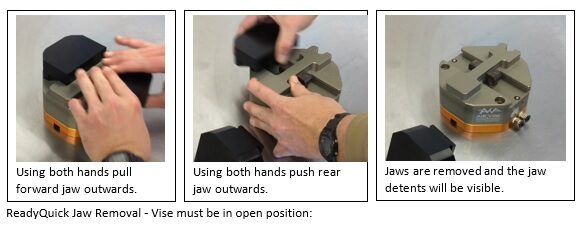
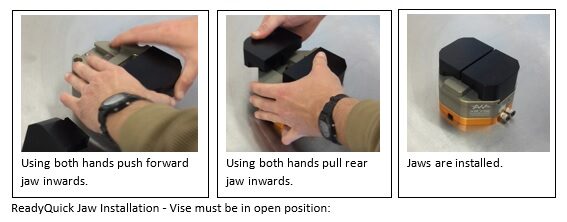
Air Vise Jaw Removal and Installation Guide
Hook the vise up to air and actuate the vise into the open position. You should then be able to press the jaws down slightly and slide them out.
Jaw Removal
Jaw Installation
Are STEP files available for Air Vise products?
Yes. Enter your name and email to download any STEP file below.
Table Vise and Jaw STEP Files:
Rotary Vise and Jaw STEP Files:
Dual Solenoid Kit Setup
Download the setup guide for the Dual Solenoid Kit below:
Dual Solenoid Kit Setup Guide (PDF)Manual Operations Kit Setup
Download the setup guide for the Manual Kit below:
Manual Kit Setup Guide (PDF)How do I become a dealer?
Becoming a dealer is straightforward—no buy-ins or minimums to get started. Create your account, then email your company info and your state resale certificate to info@airvise.com. Once verified, your account will be updated for dealer pricing. You can order by phone (866-836-0961), online with your account, or by emailing your order.
How do you recommend cutting the jaws?
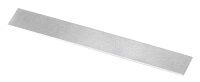
Use the supplied 0.032" shim inserted between jaw faces and close vise.
- Use a graduated depth cut to start — plunge cutting is not recommended.
- Multiple passes are acceptable for clean up if required/desirable.
- General guidelines for cutting 7075-T6 aluminum are recommended.
- No additional compensation for anodizing required.
Harvey Tool has excellent recommendations for feeds and speeds for cutting aluminum:
Attacking Aluminum: A Machining Guide (Harvey Tool)How easy is it to use Air Vise?
Watch the demo to see just how simple it is:
Specs for Table and Rotary Vises
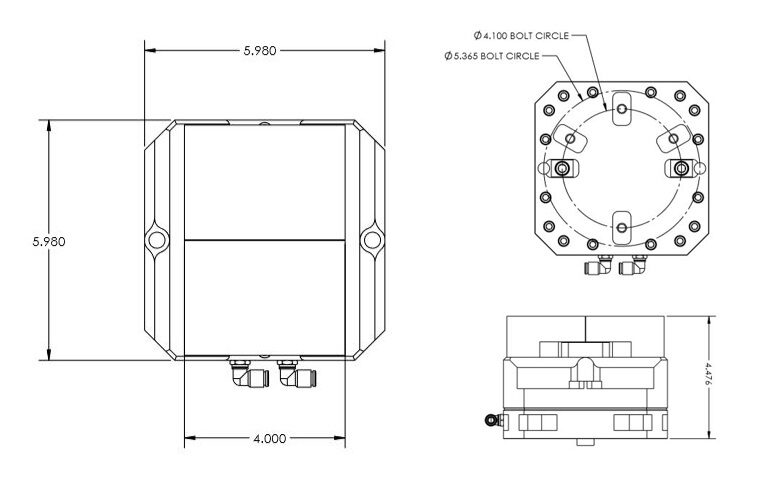
Table Vise Specs:
- Footprint — 5.980 in x 5.980 in
- Jaw Opening Capacity — 0.200 in
- Jaw Width — 4.000 in
- Maximum Operating Pressure — 200 psi
- Throat Depth — 15/16 in
Rotary Vise Specs:
- Footprint — 6.000 in x 6.000 in
- Jaw Opening Capacity — 0.200 in
- Jaw Width — 4.000 in
- Maximum Operating Pressure — 200 psi
- Throat Depth — 15/16 in
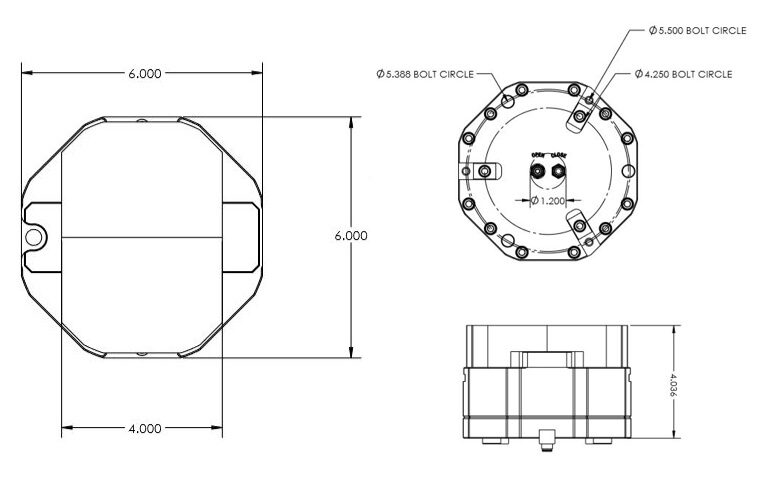
Table Vise Installation Guide
Watch the installation walkthrough:
What is included with the Table and Rotary Vise?
Table Vise includes:
Workholding hardware, fixture keys, jaw shim and fittings.
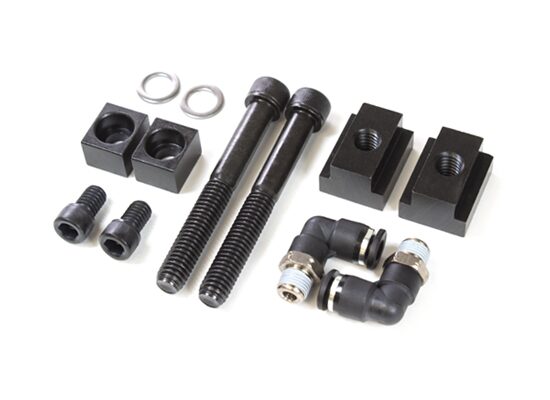
- Qty 2 — 3/8-16 x 3" SHCS
- Qty 2 — Washer
- Qty 2 — 9/16 T-Slot Nut, 3/8-16 Thread
- Qty 2 — 5/8 Vise Key
- Qty 2 — 1/2 in Vise Key SHCS
- Qty 2 — 1/4" Tube, 1/8" NPT Elbow Fitting
- Qty 1 — 0.032 Jaw Shim
Rotary Vise includes:
Workholding hardware, fixture keys, jaw shim and fittings.
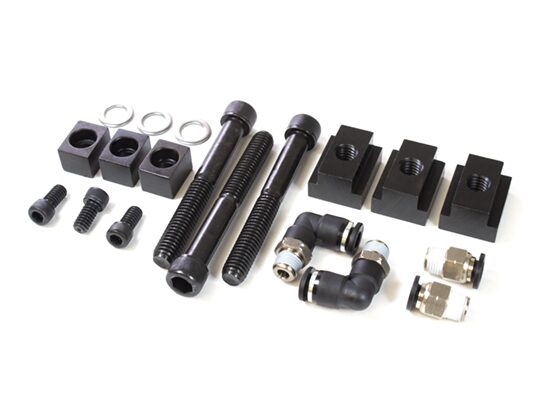
- Qty 3 — 3/8-16 x 3" SHCS
- Qty 3 — Washer
- Qty 3 — 9/16 T-Slot Nut, 3/8-16 Thread
- Qty 3 — 9/16 Vise Key
- Qty 3 — 1/2 in Vise Key SHCS
- Qty 2 — 1/4" Tube, 1/8" NPT Elbow Fitting
- Qty 2 — 1/4" Tube, 1/8" NPT Straight Fitting
- Qty 1 — 0.032 Jaw Shim
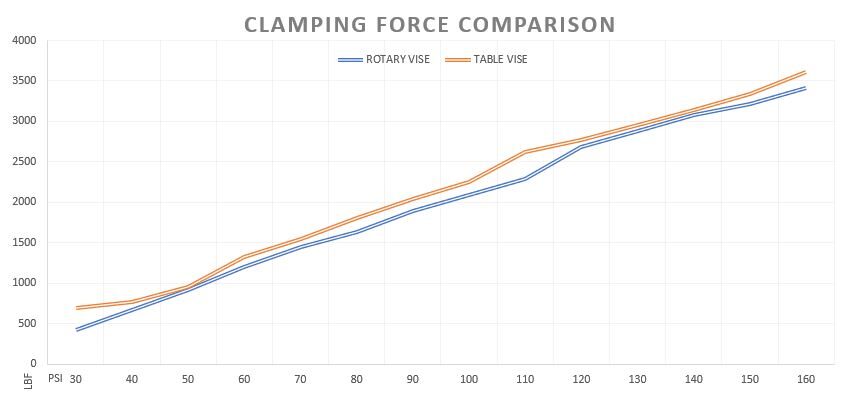
What is the clamping force for the Table and Rotary Vises?
Adjustable clamping force using a regulator:
How do I contact Air Vise & Workholding?
Use the Contact pop-up on this site, or reach out by email at info@airvise.com or by phone at 866-836-0961.
Order Status
Has my order shipped?
Check your order status in your AirVise.com account under “My Account / Order Status.”
How do I change quantities or cancel an item in my order?
Please call 1-866-836-0961 or email info@airvise.com
How do I track my order?
Use “My Account / Order Status” on AirVise.com to view tracking details.
My order never arrived — what should I do?
First, check “My Account / Order Status” to confirm everything has shipped. If tracking shows “delivered” but you don’t have it, contact customer service for help.
An item is missing from my shipment
Check “My Account / Order Status” to confirm all items shipped. If tracking shows “delivered” but something’s missing, contact customer service.
My product is missing parts
Check “My Account / Order Status” to confirm shipment details. If tracking shows “delivered” and parts are missing, contact customer service.
When will my backorder arrive?
Backordered items will ship as soon as they are back in stock. Please call customer service for an ETA.
My Account
How do I create an account?
Go to “My Account / Order Status” on AirVise.com, enter your email address, choose “I am a new customer,” and follow the prompts. Your information is kept private and is not sold.
How do I edit my account information?
Use “My Account / Order Status” on AirVise.com to update your account details.
How much is shipping?
Shipping is automatically calculated before you submit payment. Add items to your cart and proceed to checkout to see shipping methods and prices.
I forgot my password — what now?
On AirVise.com under “My Account / Order Status,” use the “Forgot your password?” link. It will email your password to you.
When will my order ship?
Availability is listed on each product page. After ordering, you can track status in “My Account / Order Status.” You’ll receive a shipment confirmation when your order ships and tracking within 24–48 hours after shipment.
Returns
How do I return my product?
Returns are handled through the official Returns page. Use the source link for details and steps.
I received the wrong product
If you believe you received the wrong item, contact customer service within 72 hours of receiving the product.
What is your return policy?
Return policy details are covered in the Terms & Conditions.
International Shipping
Do you ship to my country?
If the website says shipping isn’t available in the country dropdown call customer service for specific rates and shipping options.
What are my payment choices?
During checkout you can choose from the available payment options. Orders ship after payment is received.
When will my order ship and what are shipping charges?
Shipping is calculated before payment. Add items to your cart and proceed to checkout to see methods and prices. Orders ship shortly after payment is received.
What is the return policy for international orders?
Return policy details are in the Terms & Conditions.
Warranty & Security
What warranty do Air Vise products include?
Air Vise vises include a 1-year warranty for manufacturer defects and malfunctions from the date of purchase. Jaws (included or purchased separately) have a 90-day warranty for manufacturer defects. If you’re having issues, email info@airvise.com or call 866-836-0961.
Do you offer a low price guarantee?
Yes—Air Vise’s commitment is to provide the best value at the best price.
Is this website secure?
Yes. The website uses SSL (secure socket layer) encryption.
Pricing & Billing
Do I have to pay sales tax?
Sales tax is charged only if you’re located in the same state as the warehouse.
I have a question about my charges
Review your orders in “My Account / Order Status” and compare with your records. If you still have questions, contact customer service.
I need a copy of my receipt or invoice
Use “My Account / Order Status” on AirVise.com to print invoices.
When will my credit appear on my account?
Credits usually take 7–10 business days from the time your item(s) are received.
When will my credit card be charged?
Your credit card will be charged within 24 hours prior to shipment of your item(s).
Buyer’s Guide
How do I buy or redeem a gift certificate?
You can purchase a gift certificate on AirVise.com. If you’re redeeming one you received, use the redemption page on AirVise.com.
How do I find the right product?
Use the navigation menus or search by keyword. If you can’t find what you need, contact customer service and we’ll help you get to the right product quickly.
How do I navigate the site?
Click the categories in the navigation, or search by keyword. Quick tip: if your cursor turns into a hand, it’s a link. If you still can’t find something, contact customer service.
How do I use a coupon?
Add items to your cart, open your cart, and enter your coupon code in the box at the bottom of the shopping cart.